Travel Booking - Reimagined
AI-powered travel discovery that guides undecided travelers from inspiration to booking through personalized recommendations.
Problem
59% of travelers begin without a destination in mind, spending an average of 33 days seeking inspiration. Current travel booking platforms are destination-focused, leaving users without clear guidance during the critical discovery phase and lacking the intuitive, personalized experience users want.
- Overwhelming options without guidance
- Users spend 33 days seeking travel inspiration before booking
- Current interfaces primarily destination-focused, leaving users without clear guidance
- Users desire a more intuitive and personalized experience tailored to them
Solution
An AI-powered discovery experience that guides undecided travelers through personalized recommendations while maintaining cost-effectiveness. The solution features distinct flows for new and returning users, leveraging Amazon AgentCore with Strands Agent Framework.
New User Experience
Guided question flow addressing top decision factors (weather, trip type, costs)
Returning User Experience
Personalized dashboard leveraging user history with tailored recommendations and streamlined booking
Key Features
Visual recommendation cards, "Best Price" badges, AI search functionality, and price comparison visibility
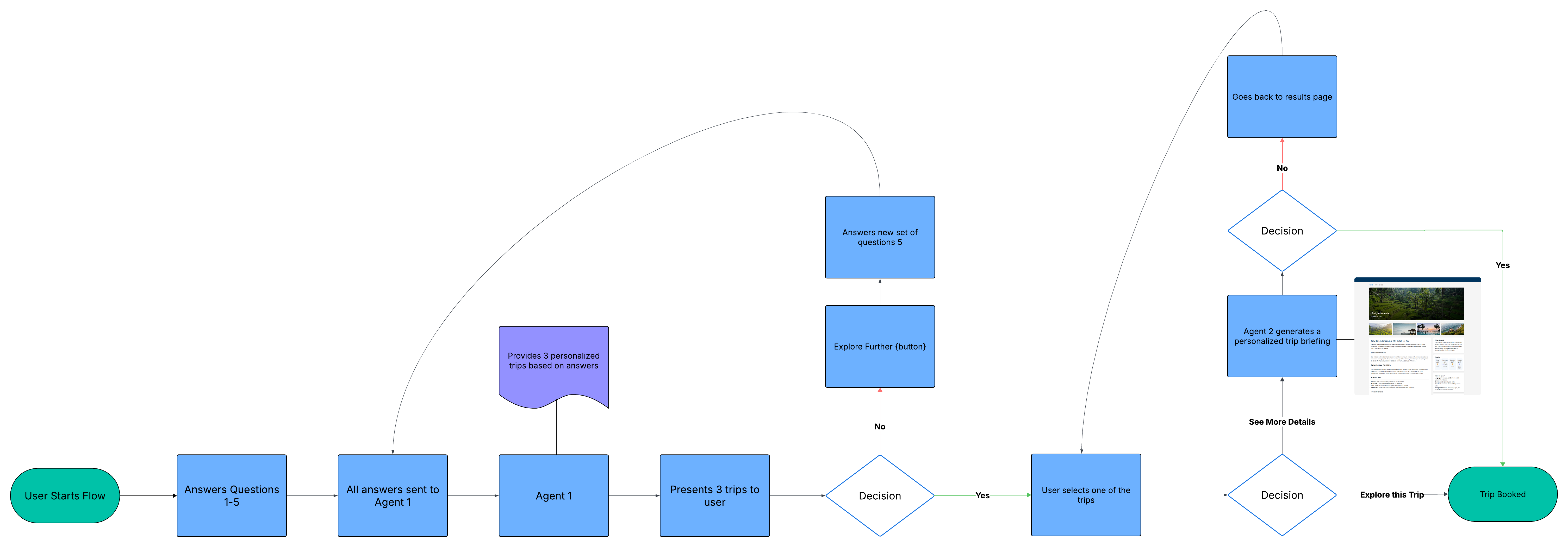
New User Flow
New User Flow Diagram
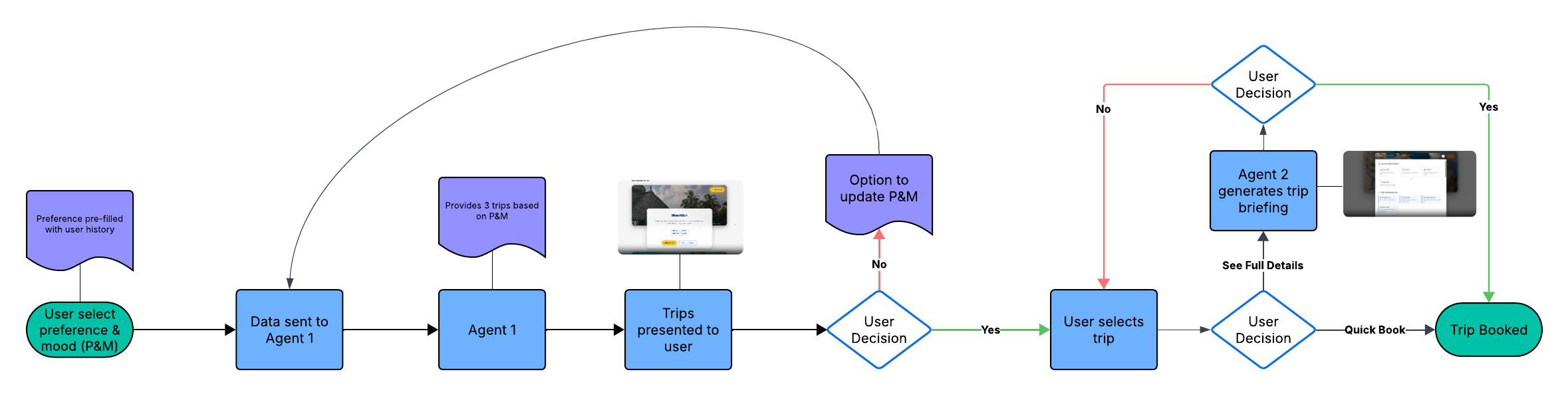
Existing User Flow
Returning User Flow Diagram
Process
Conducted user research with travelers to validate pain points
Built a prototype utilizing Claude
Presented to 5 stakeholders and received sign-off
Collaborated with engineering to build production-ready on AWS
Prototype Validation
"Can I use this to book trips right now? I much rather prefer this over the current process" — User Feedback
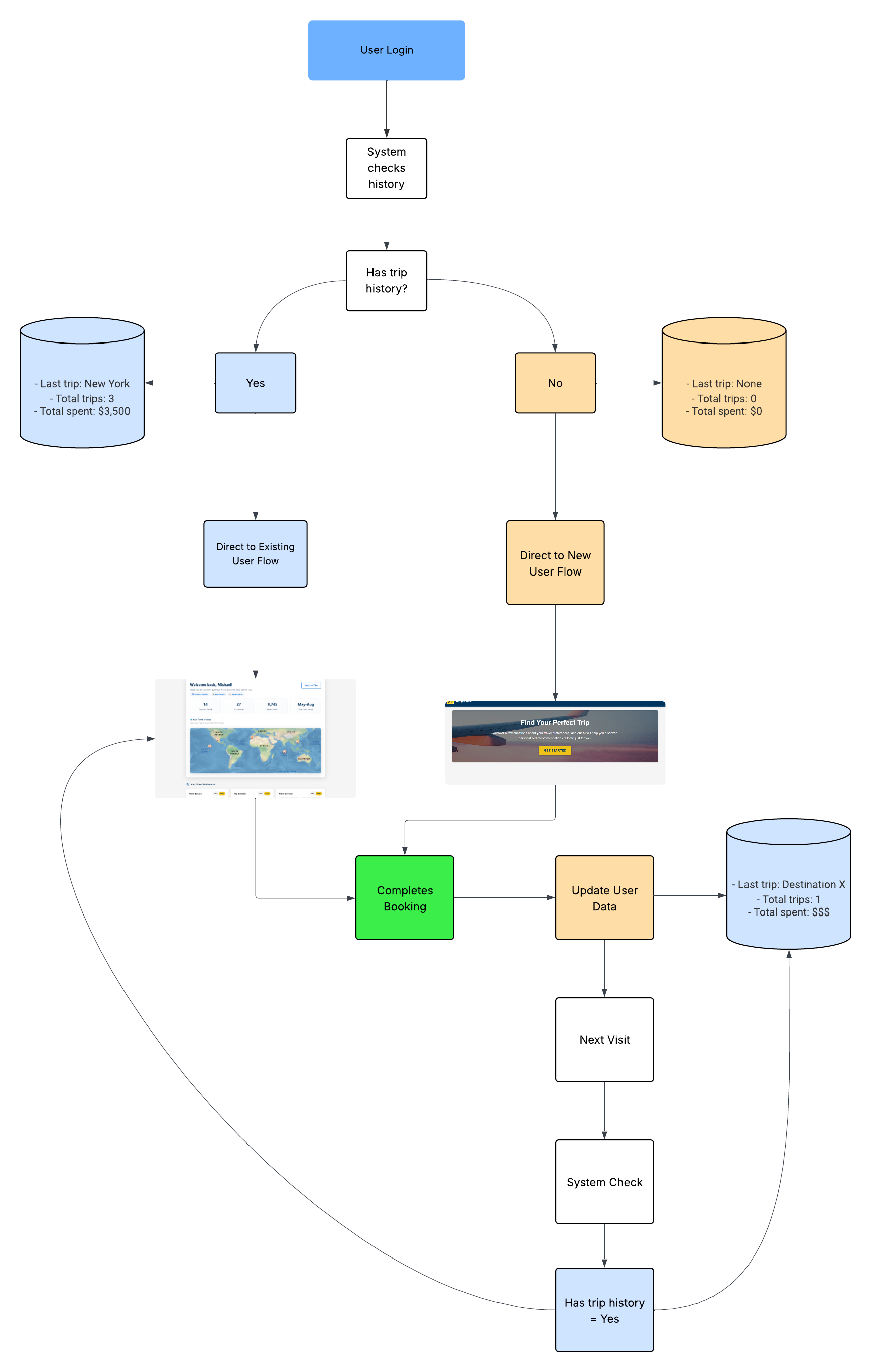
User Flow Logic - Diagram
SalesNav Export: One-Click Prospect Exporter
One-click browser tool that eliminates manual data copying from LinkedIn Sales Navigator, reducing export time by 98% and errors by 99%.
Problem
Demand Generation team members wasted hours manually copying individual prospect data from LinkedIn Sales Navigator to spreadsheets, causing errors and reducing strategic focus time.
Challenge: Design a seamless, time-saving solution that eliminates repetitive copying while maintaining data accuracy and fitting naturally into existing workflows.
Research & Key Insights
User Pain Points:
- Hours spent on manual data transfer
- Constant context switching between platforms
- Frequent data entry errors
- Limited time for strategic prospect evaluation
Workflow Analysis Findings:
- Identified specific data points most valuable to users (Name, Title, Tenure, Location)
- Mapped repetitive copy-paste patterns and context switches
- Documented error-prone steps in the existing process
Solution
A browser extension that enables one-click export of prospect data from LinkedIn Sales Navigator, with customizable field selection and multiple export formats.
Key Features:
- One-Click Export Export multiple customer profiles instantly without manual copying
- Customizable Fields Select specific data points (Name, Title, Tenure, Location) based on needs
- Flexible Export Options CSV download or clipboard copy for immediate use in spreadsheets
- Browser Integration Seamless toolbar integration with LinkedIn Sales Navigator interface
Before: Manual Process
After: One-Click Export
Results & Impact
Efficiency Gains:
- Decreased data export time by 98%
- Reduced data entry errors by 99%
- Enabled 90% more prospects added to outreach lists weekly
User Adoption:
- 100% adoption across the DG team
- User testimonial: "I don't see a scenario where everyone on the team doesn't use it"
- Expanded functionality based on user feedback within 24 hours
Business Value:
- Freed DG team to focus on prospect evaluation rather than data collection
- Improved data quality in outreach lists
- Enhanced team capacity without additional headcount
QuickPaste: Accelerate LinkedIn Sales Messaging
Browser tool that automates LinkedIn message personalization with one-click template insertion and automatic name detection, reducing messaging time by 89%.
Problem
Sales teams spent 30-45 seconds per LinkedIn message on repetitive tasks: copying templates, pasting them, and manually typing recipient names 50-100+ times daily.
Challenge: Create a browser tool that eliminates repetitive messaging tasks while maintaining message personalization.
Research & Key Insights
User Pain Points:
- Manual copying from message templates
- Repeated typing of recipient names
- Frequent typing errors
- Excessive context switching
- 30-45 seconds spent per message on formatting
Workflow Observations:
- Mapped the repetitive copy-paste pattern
- Identified name insertion as the most time-consuming element
- Documented error patterns in manual personalization
Solution
A browser extension that enables one-click template insertion with automatic name detection, eliminating manual copying and typing while maintaining personalized messaging.
Key Features:
- One-Click Template Insertion Insert pre-saved templates with automatic name detection in a single click
- Template Storage Store multiple templates within the browser for quick access
- Subject & Body Support Support for both subject line and message body templates
- LinkedIn Integration Direct integration with LinkedIn's messaging interface for seamless workflow
Before: Manual Process
After: QuickPaste Automation
Results & Impact
Time Savings:
- Reduced message personalization from 45 to 5 seconds (89% improvement)
- Saved approximately 33.3 minutes per day per user
- Eliminated naming errors in outreach messages
Capacity Increase:
- 50% higher daily outreach volume
- More time for research and account planning
- Consistent messaging across the team
Business Value:
- Increased outreach capacity without additional headcount
- Improved message quality and consistency
- Better use of sales team expertise